


Pinterest Trends Tool: Your Campaign Planning Engine
Most brands open the Pinterest Trends tool to check what’s popular this week. But actually, the data is far more useful read the other way round. What was a growing trend this time last year tells you what to publish organic and/or paid content for today, while there’s still time to gain visibility before demand peaks.
The Pinterest Trends tool is a free keyword and search-insight tool, inside every Pinterest business account and at trends.pinterest.com, that shows what people search for on Pinterest, how those searches move through the year, and when interest in a topic peaks. This guide is for e-commerce managers, DTC founders, and marketers who want to use that data to time seasonal campaigns properly. If you sell seasonal products or work with a long purchase window, Pinterest Trends is the tool that tells you when to move.
Three types of trend indicators
Before you plan anything, it helps to know that Pinterest publishes three separate trend data items, and each do a different job.
Pinterest Trends Tool
The first is the Pinterest Trends tool itself. This is the live, search-your-own-keyword tool. You type in a term, pick a country, and see the search curve over the past one or two years, plus related keywords and demographic splits. It answers “when do people search for this, and what else do they search alongside it?”
Pinterest Predicts
The second is Pinterest Predicts. This is the annual report Pinterest releases each December, forecasting the trends it expects to grow over the coming year. The 2026 edition named 21 trends across fashion, beauty, home, food, and travel. Pinterest reports that 88% of its predictions over the past six years have come true. So, it’s worth paying attention to when you’re planning a year ahead. Predicts answers “what’s coming that isn’t here yet?”
Seasonal Trend Reports
The third is the seasonal trend reports, like the Summer 2026 report. These sit between the other two. They identify the specific searches growing right now as people plan a particular season, and they’re aimed squarely at brands deciding what to push next quarter.
So one tool is live and yours to query, one is a yearly forecast, and one is a seasonal snapshot. When someone says “I checked Pinterest Trends,” it’s worth knowing which of the three they mean, because they lead to different decisions. The three sit alongside each other in a working strategy: Predicts for the annual shape, the seasonal reports for the quarter, and the Trends tool to compare specific keywords against real data.
Look back a year to plan ahead
Plenty of folks open the Trends tool and read it in the present tense, checking what’s peaking now. However, by the time a search term is peaking, you’re too late. Because, by the time a search term is peaking, you’re too late. The audience is already deep in their decision and your fresh pins haven’t had time to be indexed.
Instead, read last year’s data for the season you’re planning. If you want to be visible for summer, you look at what happened last July. If you’re planning a Christmas range, you study the previous October to December curve. Pinterest search is seasonal and cyclical, so last year’s pattern is the most reliable guide you have to this year’s. The trick to being visible on Pinterest at the right time is always to plan backwards.
A useful rule is to look roughly ten months back, which gives you a one to two month head start on the curve. Then watch for the moment a keyword sits at around 25 to 30% of its seasonal peak. That early climb is your signal to start pinning. Publish then, and your content has time to be indexed and gather saves before search volume starts to go up. If you wait until the peak, you’ll be riding the back of the wave instead of the front.
Pinterest’s long purchase window is what makes this effective, because people come to Pinterest to plan things that haven’t happened yet. A holiday, a renovation, a wedding, a seasonal wardrobe. They’re searching weeks or months before they buy. For travel brands this gap is even wider, because trip planning often starts a full season ahead of the booking. The Trends tool lets you see that lead time as data, then place your content inside it.
Set your region to your target country, because some trends can differ significantly between markets. Filter by age, gender, and category to match your audience. Pull last year’s curve for your season. Identify the keywords climbing toward their peak. Then build and schedule your pins for publication while the curve is still rising.
Instead of reading Pinterest Trends to see what’s popular now, use it to plan backwards: what was rising this time last year is what you should be publishing for today.
Reading keywords the way your customers actually search
Timing is half the job. The other half is using the words your customers actually search for, so they can find your pins once they’re published. The Trends tool is one of the cleanest ways to see specific and most frequently used search terms.
Take a simple example. Search “barbecue” and you’ll see one curve. Search “barbeque” and “bbq” and you’ll see very different volumes for what is, to you, the same product. If your pin titles and descriptions only use “barbecue,” you’re invisible to everyone searching “bbq.” That single spelling choice can easily halve your reach.
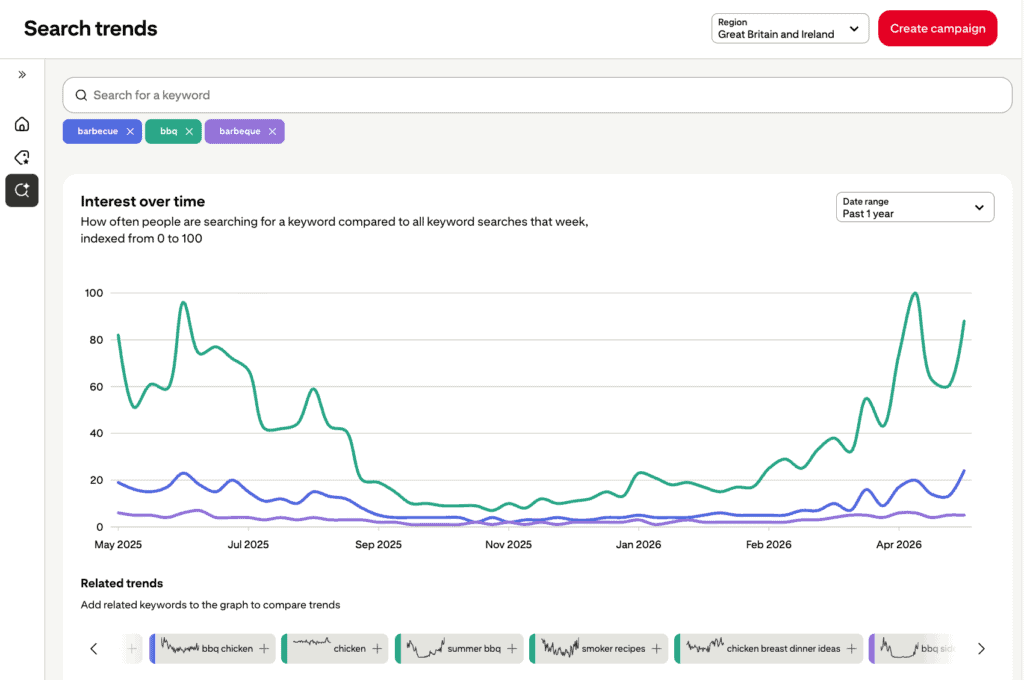
There’s a useful trick for digging deeper. Type your main keyword, add a space, then a single letter of the alphabet. Pinterest autocompletes with real related searches you may not have thought to check. Type “bbq b” and you might surface “bbq baby shower ideas,” a niche with real volume that sits invisibly inside the broader “bbq” search. Working through the alphabet this way is one of the fastest ways to find sub-niches and content angles competitors miss.
The comparison feature is worth using too. Rather than guessing whether to build around one keyword or another, put them side by side. “Indoor plants” against “trailing plants,” say, or two product terms you’re deciding between. The tool shows relative demand for each, so you build around the one with the stronger, better-timed curve rather than a hunch. Feed those findings into your pin titles, descriptions, and board names, so your timing strategy and Pinterest SEO are pulling in the same direction.
Pinterest Shopping Trends
The Pinterest Trends tool has a Shopping Trends option that only appears when you set the region to the United States, Canada or UK. Switch your region to one of these, and a new section surfaces on the left.
The standard Trends view shows search interest, which includes everyone browsing and saving for later. Shopping Trends shows shopping-intent volumes, so people searching with the intention to buy. You get product rankings ordered by growth, demographic breakdowns by age and gender, evolution over the past 24 months, and forecasts for the months ahead.
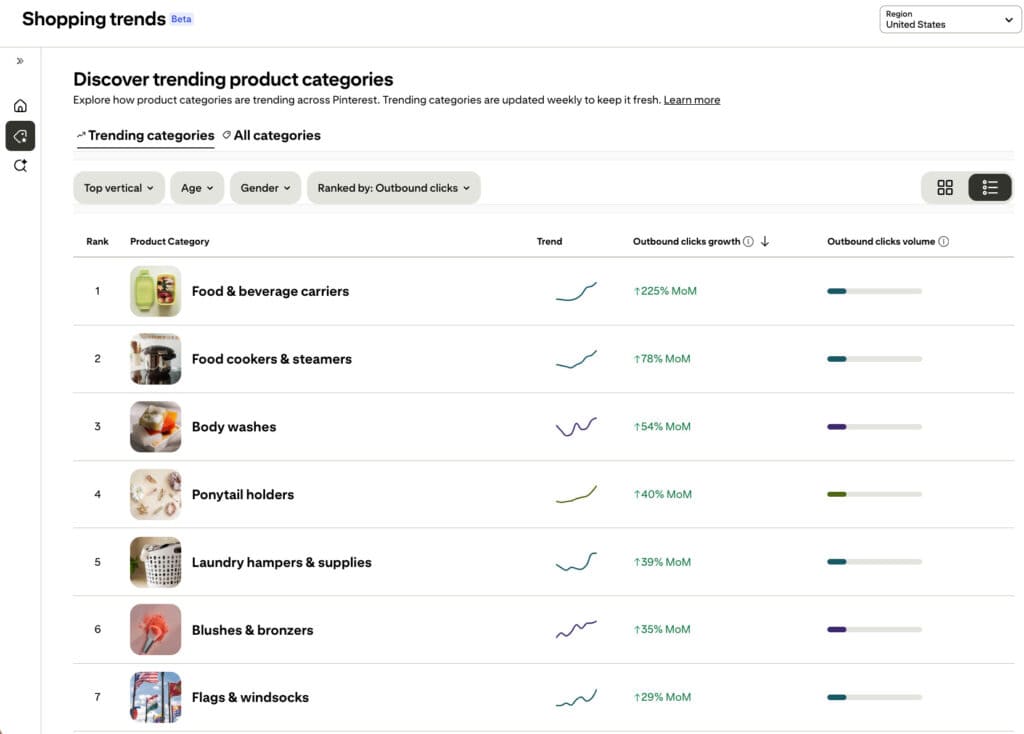
Right now this Shopping Trends data is only available for the US, Canada and the UK. If your market is in another region, this data is still useful in two ways. For established seasonal demand, summer dresses, Father’s Day, back to school, the pattern is broadly similar across Western markets, so the curve for anglophone markets works as a reliable proxy when your own region’s shopping data isn’t available. And for genuinely new trends that originate in the US, you often get a few months’ early warning before they reach other markets. Either way, you’re getting shopping-intent data you can act on. Pinterest is expected to roll Shopping Trends out to more countries over the coming months.
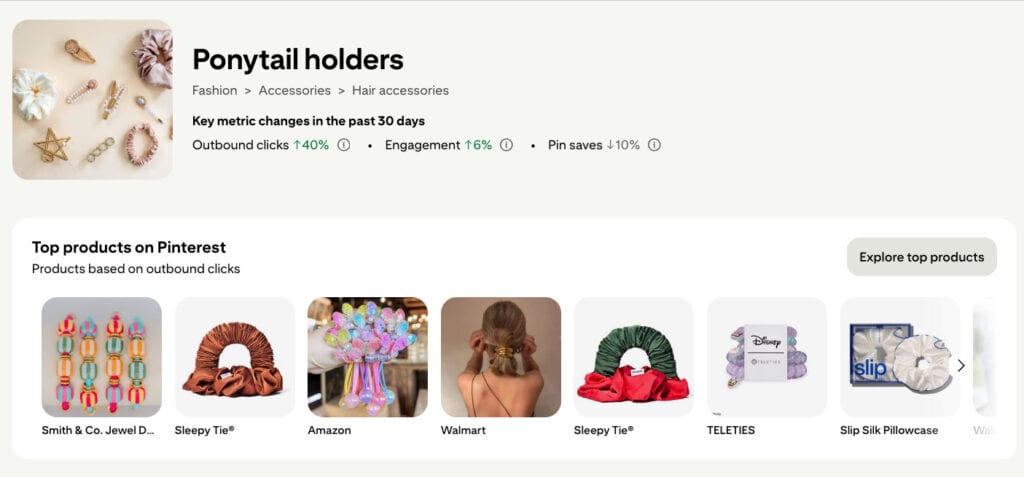
There’s a listing nested within that is worth knowing about too. Pinterest surfaces a set of top-performing products, and from there you can click straight through to the best-performing pin for each. That takes you to the actual website and creative behind it, so you can study how a strong performer is positioned and apply the thinking to your own range. It’s competitive insight, free, inside a tool you already have.
Match demand to who’s actually searching
A rising keyword trend only counts if the people searching it are people you can sell to. The Trends tool gives you the demographic breakdown behind each term, so you can check who’s actually behind the search before you build around it.
Pinterest is sometimes viewed as a mostly older, female platform. However, Gen Z is now the largest generational cohort at around 42% of all users, having overtaken Millennials, and it’s the fastest-growing segment on the platform. The audience still skews female, but the male share has grown to around 17% and is climbing. This means you’ve got a genuine mix of generations, probably more so than any comparable platform. My full breakdown of Pinterest demographics goes into how the audience has shifted.
What unites them is intent and spending power. Around 70% of Pinterest users arrive with shopping intent rather than passively browsing, and 76% earn above the median income. That combination is part of why average order values from Pinterest can run higher than from platforms like Meta, with some advertisers reporting baskets 20 to 30% higher, though you should test that against your own numbers rather than take it as a given.
So, check the age and gender split for your key search terms in the Trends tool before you build around them. A keyword climbing among Gen Z women naturally calls for different creative and price positioning than one rising with Gen X.
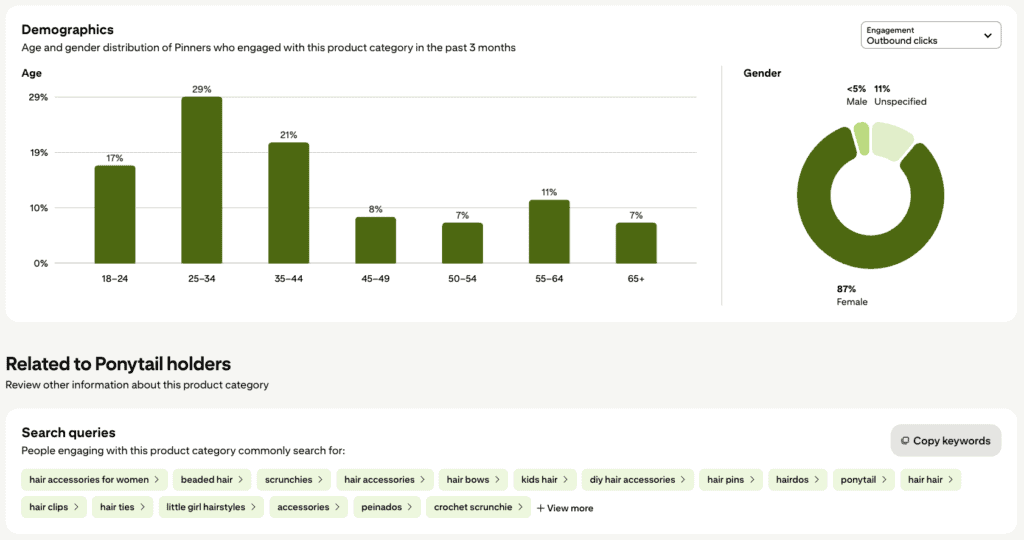
The same view also surfaces the search queries people use when engaging with that category. So for ponytail holders, you’d see related terms like “scrunchies,” “hair bows,” “diy hair accessories,” “kids hair,” and “hair clips.” These are real Pinterest searches from the audience already engaging with the category. It’s another effective method for finding highly relevant pin description keywords and board name inspiration.
The right way to use LLMs with the Pinterest Trends tool
Don’t ask ChatGPT, Claude, or Gemini to give you Pinterest keywords directly. They’ll hand you a tidy list, and it’ll look right, but most of those terms are Google keywords dressed up as Pinterest ones. Google search behaviour and Pinterest search behaviour are not the same thing. People phrase things differently when they’re planning visually versus looking something up.
Instead, use the Pinterest Trends tool to pull the real data first. Export the keyword and trend information, then feed that export to the LLM for analysis. Now the model is working with genuine Pinterest search data instead of its own assumptions, and you get useful pattern-spotting, clustering, and angle ideas on top of accurate inputs.
People increasingly start their search inside AI tools as well as Google and Pinterest, so getting your Pinterest keyword research grounded in real platform data, then layering AI analysis on top, is one of the smarter ways to stay visible across all of them.
What the Pinterest Trends tool really gives you
The advantage goes to whoever reads Pinterest Trends data early and acts on it. Used alongside Pinterest Predicts and the seasonal trend reports, the Trends tool gives you something most channels can’t: a year of forward visibility on what your customers will be searching for, when, and in the language they’ll use.
A clearer view on Pinterest, in 20 minutes
If you’d like to know what Pinterest could realistically do for your brand, book a discovery call. Bring your questions, your goals, or just your curiosity. No pitch, just a straight conversation about whether Pinterest is worth your time and where to focus if it is.
Frequently Asked Questions
What is the Pinterest Trends tool?
The Pinterest Trends tool is a free search-insight tool inside every Pinterest business account, also available at trends.pinterest.com. It shows what people search for on Pinterest, how those searches change through the year, and when interest in a topic peaks. Marketers use it for keyword research and to time seasonal campaigns before demand rises.
Is the Pinterest Trends tool free?
Yes. It’s free with any Pinterest business account, which is also free to set up. It’s one of the most underused free resources in e-commerce marketing.
What’s the difference between Pinterest Predicts and the Pinterest Trends tool?
Pinterest Predicts is an annual report, released each December, forecasting trends expected to grow over the coming year. The Pinterest Trends tool is a live tool you query yourself to see real search data for specific keywords. Predicts tells you what’s coming; the Trends tool lets you check and time it against real numbers.
How far in advance should I plan Pinterest campaigns?
Start publishing when a seasonal keyword reaches roughly 25 to 30% of its peak search volume, which usually gives you a one to two month head start. Because Pinterest has a long purchase window, planning two to three months ahead of a season is sensible, and for travel brands often longer. The goal is to be indexed before demand peaks.
What is Pinterest Shopping Trends?
Pinterest Shopping Trends is an option inside the Trends tool that shows shopping-intent search data: product rankings by growth, demographic splits, and forecasts. It’s currently available when the region is set to the United States, Canada, or Great Britain and Ireland. Brands in other markets can still use it, either as a proxy for established seasonal demand or as an early signal for new trends emerging in those markets.
Can I use ChatGPT for Pinterest keyword research?
Not on its own. AI tools tend to return Google keywords rather than genuine Pinterest search terms, because the two platforms are searched differently. The reliable method is to pull real data from the Pinterest Trends tool first, then feed that export to an AI tool for analysis. Real data first, AI second.
Any other questions?
If you have more questions about Pinterest visual search or marketing, I’m happy to help. Drop me a message on LinkedIn or book a discovery call.
Pin for later!

Mary Lumley – Pinterest Marketing for eCommerce & Travel / Pinterest Trends Tool: How to Use it to Plan Better Campaigns
